This is the common question I have heared from many developers, clients when they start to build Power Platform solution. Many clients like sharepoint in first place, because it’s comes with most of the M365 subscriptions. but dataverse need to purchase additional license.which often leads to questions like:
- Why should we pay for Dataverse when SharePoint is already included?
- Is Dataverse really worth the additional cost?
- Can SharePoint handle all our business requirements?
These are valid questions, and in many cases, SharePoint is the right choice. But remember, the free option isn’t always the best option. Choosing the wrong data source can lead to performance issues, delegation limitations, security challenges, and unnecessary redevelopment as your application grows.
In this article, we’ll compare SharePoint and Dataverse based on real-world scenarios to help you choose the right data source for your next Power Apps solution.
Before comparing them, let’s first understand what SharePoint and Dataverse are and what they are designed for.
What is Sharepoint ?
Microsoft SharePoint is primarily a collaboration and document management platform that enables organizations to store, organize, and share information securely. In Sharepoint we can store data in Sharepoint lists and document libraries. SharePoint Lists have become one of the most popular data sources for Power Apps.
Because Sharepoint comes with most of the M365 subscriptions, many organizations use it to create Powerapps, power Automate flows without purchasing additional premium licenses.
What is Dataverse?
Microsoft Dataverse is a cloud-based relational data platform built specifically for Microsoft Power Platform. It provides a secure and scalable way to store business data while supporting complex relationships, business rules, and enterprise applications.
Unlike SharePoint, Dataverse is designed as a true relational database. It offers advanced features such as role-based security, auditing, business logic, and seamless integration with Power Apps, Power Automate, Dynamics 365, and other Microsoft services.
Now we have basic idea about Sharepoint and Dataverse. Let’s compare it’s features.
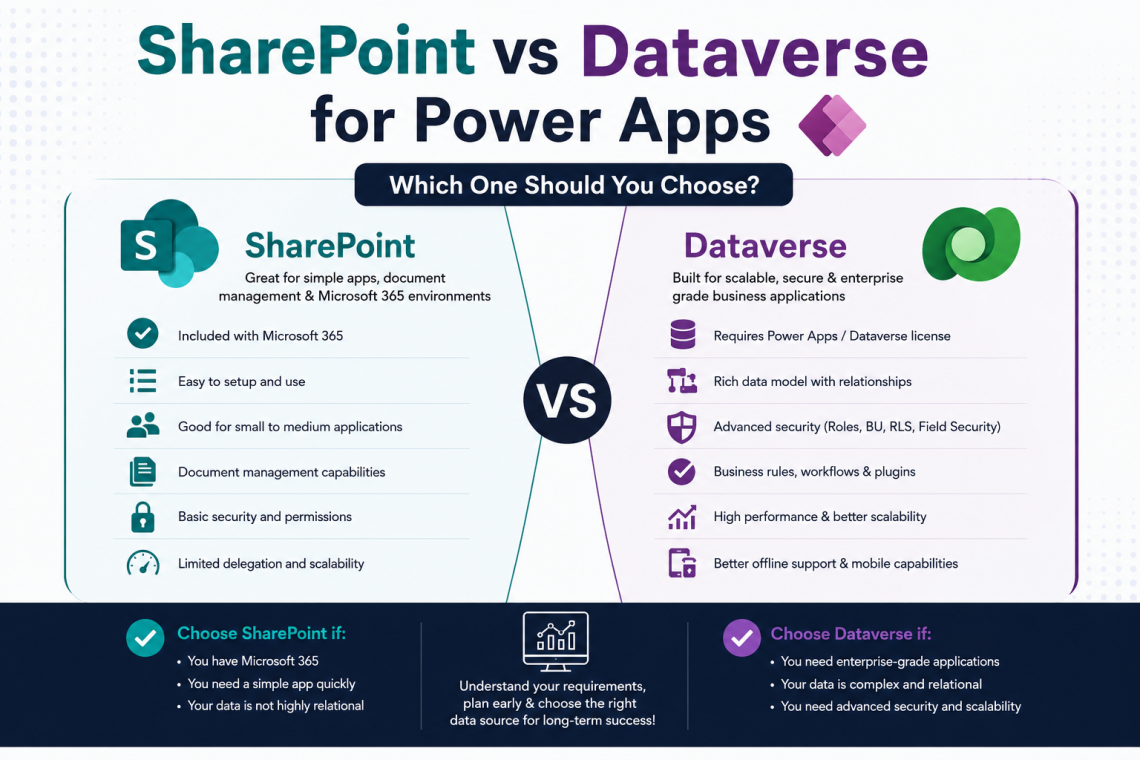
Feature Comparison
| Feature | SharePoint | Dataverse |
|---|---|---|
| Licensing | Included with most Microsoft 365 subscriptions | Premium license required |
| Ease of Setup | Simple and quick | More configuration required |
| Scalability | Good for small to medium apps | Excellent for enterprise applications |
| Data Relationships | Limited (Lookup columns) | Full relational database support |
| Security | SharePoint permissions | Advanced role-based security |
| Performance | Good for smaller datasets | Optimized for large datasets |
| Delegation | More delegation limitations | Better delegation support |
| Business Rules | Limited | Built-in business rules and validation |
| Auditing | Basic version history | Advanced auditing and change tracking |
| Offline Support | Limited | Better offline capabilities |
| Integration | Microsoft 365 ecosystem | Power Platform & Dynamics 365 |
💭 My Experience
In my projects, I usually recommend SharePoint for applications like Leave Management, Claims, and Attendance because it’s cost-effective and integrates well with Microsoft 365. However, when the solution requires advanced security, or is expected to scale significantly, I recommend Dataverse from the beginning to avoid future migration and redesign.
Performance
Performance is one of the important things to consider when choosing a data source for your application. While both SharePoint and Dataverse perform well, the experience can be very different as your application grows.
SharePoint works well for small to medium-sized applications. But as the number of records increases, you may start experiencing slower loading times, delegation limitations, and more complex formulas to maintain good performance. Dataverse is built specifically for business applications and can handle larger datasets more efficiently. Features like server-side processing, indexing, and optimized querying make it a better choice for enterprise applications with high data volumes.
💭 My Experience
In one of my projects, I worked with a SharePoint list containing over 40,000 records. As the application grew, users started experiencing slower performance and delegation warnings. By optimizing formulas, filtering data properly, and reducing unnecessary data retrieval, we significantly improved the application’s performance. However, it also highlighted that if the solution continued to grow, Dataverse would have been the better long-term choice.
Security
Security is another important factor when choosing a data source for your Power Apps application.
SharePoint uses SharePoint site, library, and list permissions to control access. This is sufficient for many internal applications. but managing permissions can become challenging as the users need different level permission for data or raw level, column level security. Dataverse has advanced security model. It supports role-based security, row-level security, field-level security, and business units, allowing organizations to control exactly who can view, edit, or delete data.
So if your application require basic user permissions, SharePoint is usually sufficient.
When I Choose SharePoint
In most of my projects, I choose SharePoint when the application is simple, no advance security need, the data structure isn’t complex, and the organization already uses Microsoft 365.
I typically recommend SharePoint for:
- Leave Management Systems
- Claims & Expense Applications
- Asset Tracking
- Approval Workflows
Since SharePoint is included with most Microsoft 365 subscriptions, it allows organizations to build business applications quickly without additional licensing costs.
When I Choose Dataverse
I recommend Dataverse when the application requires advanced security and more complexity. Although it comes with additional licensing costs, it offers greater flexibility, security, and scalability for enterprise solutions.
I typically recommend Dataverse for:
- Customer Relationship Management (CRM) systems
- Service Desk & Ticketing Systems
- Applications with multiple related tables
- Business-critical applications requiring advanced security
Lessons Learned
After working with both SharePoint and Dataverse in different Power Apps projects, I have learned that there isn’t a single “best” choice. The right data source always depends on the application’s requirements.
Here are a few lessons I have learned:
- Don’t choose SharePoint just because it’s free. Consider the application’s future growth and complexity.
- Don’t choose Dataverse just because it’s Microsoft’s premium platform. If the application is simple, SharePoint may be the more practical solution.
- Think long-term. Migrating from SharePoint to Dataverse later can require significant effort and planning.
- Understand the business requirements first. The right choice should support both current needs and future scalability.
- Performance starts with good design. Regardless of the data source, efficient app design and proper data modeling are essential for a responsive Power Apps solution.
- Design your app with delegation in mind from the beginning. Using delegable functions, proper filtering, and efficient data retrieval can significantly improve performance and prevent issues as your data grows.
Choosing the right data source at the beginning of a project can save time, reduce costs, and prevent unnecessary redevelopment in the future. Technology should always support the business, not the other way around.